
🔗 Checkout and Payment Link
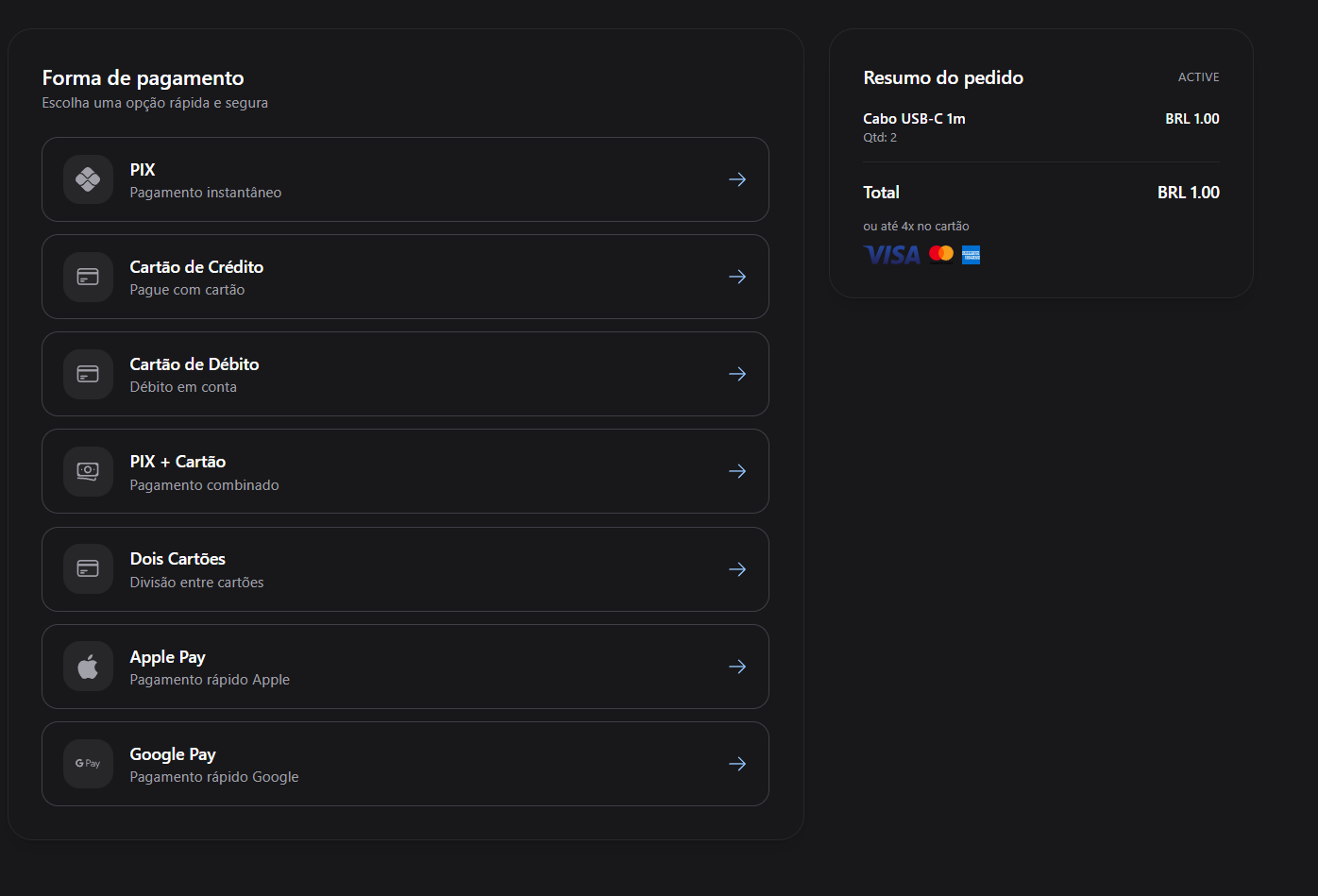
This flow allows you to create a Checkout/payment link associated with a wallet, supporting multiple payment methods in a single checkout experience. The payer can choose how they wish to pay. theAPI Reference.
SDK checkout iframe and modal
ImportantPlease contact our support team to enable the required payment methods and currencies for your operation. Certain configurations may vary depending on the account or region.
Important —is_checkoutBehaviorWhen
is_checkoutis set totrue, the checkout session is single-use and will expire automatically after the charges are generated.When
is_checkoutis set tofalse, the checkout becomes a reusable payment link that can be used multiple times.Please contact our support team to enable the required payment methods and currencies for your operation. Certain configurations may vary depending on the account or region.
sequenceDiagram
    participant Merchant
    participant API
    participant Payer
    participant CheckoutPage
    participant Webhook

    Merchant->>API: POST /wallet/payment-link
    API-->>Merchant: Returns payment_link + checkout URL
    Merchant->>Payer: Sends checkout link
    Payer->>CheckoutPage: Accesses checkout page
    CheckoutPage->>Payer: Displays payment method options
    Payer->>CheckoutPage: Selects method and pays
    CheckoutPage->>API: Processes payment
    API-->>Webhook: Sends charge status (paid, confirmed, etc.)
    CheckoutPage-->>Payer: Redirects to redirect_url
✅ Supported Payment Methods
| Option | Description |
|---|---|
pix | Instant payment via Pix (Brazil only) |
credit_card | Payment using a credit card |
debit_card | Payment using a debit card |
pix_and_card | Combines Pix and Credit Card – user chooses |
card_and_card | Combines two card methods – fallback configuration |
applepay | Payment using apple pay |
googlepay | 🚧 Coming soo |
🚀 Flow Overview
- You create a checkout via the API.
- Redirect the payer to the checkout page provided in the response.
- The payer selects a payment method and completes the payment.
- A webhook notifies your system of the charge status.
- The payer is redirected to your configured URL after payment.
📬 API – Create Chekout
{
  "wallet_uuid": "ab878127-3ee4-458c-a59a-87e06507eb26",
  "merchant_id": "ab878127-3ee4-458c-a59a-87e06507eb26",
  "currency": "BRL",
  "billing_type": "installment",
  "charge_type": [
    "pix",
    "credit_card",
    "debit_card",
    "pix_and_card",
    "card_and_card",
    "applepay"
  ],
  "name": "Payment - House Rental",
  "description": "Rental payment split among participants",
  "value": 1200.50,
  "payer_name": "John Silva",
  "payer_tax_id": "12345678909",
  "payer_email": "[email protected]",
  "payer_cell_phone": "+5511998765432",
  "payer_address": {
    "street": "Flowers Street",
    "address_number": "123",
    "complement": "Apartment 45",
    "neighborhood": "Jardim Paulista",
    "city": "Sao Paulo",
    "state": "SP",
    "postal_code": "01310930",
    "country": "BR"
  },
  "items": [
    {
      "name": "Beach House Rental",
      "img": "https://example.com/images/beach-house.png",
      "description": "Daily rate for the period from January 10th to 15th",
      "quantity": 1,
      "total_amount": 1200.50,
      "unit_amount": 1200.50,
      "sku": "BEACH-HOUSE-001",
      "code": "ITEM001"
    }
  ],
  "max_installment_count": 3,
  "is_checkout": true, // Important! default is False
  "data_only": false,
  "threeds_authentication": false,
  "antifraud_info": {
    "sales_channel": "web",
    "cardholder_logged_in": true,
    "cardholder_since_days": 365,
    "days_since_first_purchase_cardholder": 300,
    "days_since_last_purchase_cardholder": 5,
    "card_replacement_count": 0,
    "profile_update_days_count": 20,
    "profile_data_changed": 0,
    "profile_field_changed": "email",
    "purchase_history": 12,
    "merchant_customer_since_days": 400,
    "days_since_first_purchase_merchant": 380,
    "days_since_last_purchase_merchant": 7
  },
  "redirect_url": "https://checkout.test.dev/redirect",
  "webhook_url": "https://api.test.dev/webhooks/payment",
  "region": "BR"
}
{
"payment_link_uuid": "0b9bffcb-2d96-42bb-8641-279bfc8aac19",
"status": "active",
"url": "https://pay.a55.tech/checkout/0b9bffcb-2d96-42bb-8641-279bfc8aac19",
"local_currency": 1,
"currency": "BRL",
"usd_currency": 0.18,
"eur_currency": 0.16
}📩 Webhook Payload
Upon payment update, the following payload will be sent to your webhook_url:
{
  "charge_uuid": "string",
  "status": "confirmed | paid | error",
  "transaction_reference": "string",
  "subscription_uuid": "nullable string",
  "payment_link_uuid": "nullable string"
}
🎯 SDK Integration - Render Checkout via iframe
Instead of redirecting your users to the checkout page, you can embed the checkout directly in your website using the A55Pay SDK. This provides a seamless payment experience with two display modes: modal (overlay) or embed (inline).
📦 Installation
Include the SDK in your HTML:
<script src="https://cdn.jsdelivr.net/npm/a55pay-sdk"></script>
🔧 Basic Usage
Use the payment_link_uuid (also called checkoutUuid) returned from the API to open the checkout:
A55Pay.open({
  checkoutUuid: '0b9bffcb-2d96-42bb-8641-279bfc8aac19',
  display: 'modal', // 'modal' or 'embed'
  containerId: 'checkout-container', // Only required for 'embed' mode

  // Callbacks
  onSuccess: (data) => {
    console.log('Payment successful!', data);
    // data contains: { chargeUuid, status, timestamp, data: [...] }
  },

  onError: (error) => {
    console.error('Payment error:', error);
  },

  onEvent: (event) => {
    console.log('Checkout event:', event);
  },

  onClose: () => {
    console.log('Checkout closed');
  }
});
📋 Configuration Options
| Parameter | Type | Required | Description |
|---|---|---|---|
checkoutUuid | string | ✅ Yes | The payment_link_uuid returned from the API |
display | 'modal' | 'embed' | ❌ No | Display mode. Default: 'modal' |
containerId | string | ⚠️ Conditional | Required for 'embed' mode. The ID of the container element. If not provided, a container will be created automatically |
onSuccess | function | ❌ No | Called when payment is successful (status: paid, confirmed, or ok) |
onError | function | ❌ No | Called when payment fails (status: error) |
onEvent | function | ❌ No | Called for other events during the checkout process |
onClose | function | ❌ No | Called when the checkout is closed (always triggered) |
🎨 Display Modes
1️⃣ Modal Mode (Default)
Opens the checkout in a centered modal overlay with a modern design, backdrop blur, and close button:
<!DOCTYPE html>
<html>
<head>
  <title>Checkout Modal</title>
</head>
<body>
  <button onclick="openCheckout()">Pay Now</button>

  <script src="https://cdn.jsdelivr.net/npm/a55pay-sdk"></script>
  <script>
    function openCheckout() {
      A55Pay.open({
        checkoutUuid: '0b9bffcb-2d96-42bb-8641-279bfc8aac19',
        display: 'modal',

        onSuccess: (data) => {
          alert('Payment successful!');
          console.log('Payment data:', data);
        },

        onError: (error) => {
          alert('Payment failed: ' + error.message);
        },

        onClose: () => {
          console.log('User closed the checkout');
        }
      });
    }
  </script>
</body>
</html>
2️⃣ Embed Mode
Embeds the checkout inline within a specific container on your page:
<!DOCTYPE html>
<html>
<head>
  <title>Checkout Embed</title>
  <style>
    #checkout-container {
      width: 100%;
      min-height: 600px;
      border: 1px solid #e0e0e0;
      border-radius: 8px;
    }
  </style>
</head>
<body>
  <h1>Complete Your Payment</h1>

  <!-- The checkout will be rendered inside this container -->
  <div id="checkout-container"></div>

  <script src="https://cdn.jsdelivr.net/npm/a55pay-sdk"></script>
  <script>
    A55Pay.open({
      checkoutUuid: '0b9bffcb-2d96-42bb-8641-279bfc8aac19',
      display: 'embed',
      containerId: 'checkout-container',

      onSuccess: (data) => {
        console.log('Payment completed:', data);
        // Redirect to success page or show confirmation
        window.location.href = '/payment-success';
      },

      onError: (error) => {
        console.error('Payment error:', error);
        // Show error message to user
      }
    });
  </script>
</body>
</html>
📨 Callback Payloads
onSuccess Payload
Triggered when payment is successful (status: paid, confirmed, or ok):
{
  chargeUuid: "abc-123",
  status: "paid", // or "confirmed" or "ok"
  timestamp: "2024-01-15T10:30:00.000Z",
  data: [{
    charge_uuid: "abc-123",
    type_charge: "pix",
    value: 100.00,
    currency: "BRL",
    status: "paid"
  }]
}
🧭 Checkout Example
Updated 2 months ago